
Starter
Core Universell tools for CRM, appointments, client records, and basic follow-up
$19.95/month
Software plan: Starter
Pricing example for discussion only. Final pricing depends on selected tools, payment setup, and final agreement.
Business tools
with connected payments and SPSeast guidance.
Universell is an all-in-one platform for CRM, customers, appointments, inventory, sales, payments, e-commerce, marketing, integrations, and analytics — the business layer beyond the terminal.
SPSeast helps you compare software tiers, included modules, add-ons, and how Universell connects with your POS and payment setup. Pricing examples are for discussion only and subject to final review.


We partnered with

Universell brings together CRM, appointments, invoicing, inventory, marketing, and reporting in one platform. SPSeast helps you compare software tiers, included tools, add-ons, and how they connect with your payment setup before you commit.
Core Universell tools for CRM, appointments, client records, and basic follow-up
$19.95/month
Software plan: Starter
Pricing example for discussion only. Final pricing depends on selected tools, payment setup, and final agreement.
Adds payment tools and connected business operations for growing merchants
$39.95/month
Software plan: Basic
Pricing example for discussion only. Final pricing depends on selected tools, payment setup, and final agreement.
Expanded marketing, inventory, analytics, and business operations for larger teams
$99/month
Software plan: Advanced
Pricing example for discussion only. Final pricing depends on selected tools, payment setup, and final agreement.
Core Universell tools for CRM, appointments, client records, and basic follow-up
$19.95/month
Software plan: Starter
Pricing example for discussion only. Final pricing depends on selected tools, payment setup, and final agreement.
Adds payment tools and connected business operations for growing merchants
$39.95/month
Software plan: Basic
Pricing example for discussion only. Final pricing depends on selected tools, payment setup, and final agreement.
Expanded marketing, inventory, analytics, and business operations for larger teams
$99/month
Software plan: Advanced
Pricing example for discussion only. Final pricing depends on selected tools, payment setup, and final agreement.
No-hardware transactions
Use your computer, tablet, or phone with the Universell dashboard
Starter
Basic
Advanced
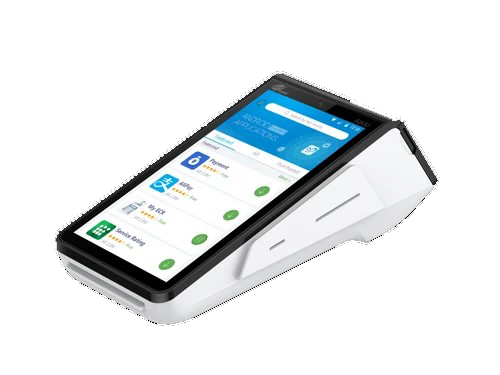
Pax POS
Starter
Basic
Advanced
Clover Mini, Flex and Station
Starter
Basic
Advanced
No-hardware transactions
Use your computer, tablet, or phone with the Universell dashboard
Pax POS
Clover Mini, Flex and Station
Card tapped, swiped, or inserted
Published Clover.com example compared with SPSeast starting rates for discussion only
Starter
Clover.com2.5% + 10¢
SPSeastStarts at approx. 0.5% + 10¢
Basic
Clover.com2.5% + 10¢
SPSeastStarts at approx. 0.5% + 10¢
Advanced
Clover.com2.5% + 10¢
SPSeastStarts at approx. 0.5% + 10¢
Card information typed in
Published Clover.com example compared with SPSeast starting rates for discussion only
Starter
Clover.com3.5% + 10¢
SPSeastStarts at approx. 1.4% + 10¢
Basic
Clover.com3.5% + 10¢
SPSeastStarts at approx. 1.4% + 10¢
Advanced
Clover.com3.5% + 10¢
SPSeastStarts at approx. 1.4% + 10¢
Card tapped, swiped, or inserted
Published Clover.com example compared with SPSeast starting rates for discussion only
Clover.com2.5% + 10¢
SPSeastStarts at approx. 0.5% + 10¢
Clover.com2.5% + 10¢
SPSeastStarts at approx. 0.5% + 10¢
Clover.com2.5% + 10¢
SPSeastStarts at approx. 0.5% + 10¢
Card information typed in
Published Clover.com example compared with SPSeast starting rates for discussion only
Clover.com3.5% + 10¢
SPSeastStarts at approx. 1.4% + 10¢
Clover.com3.5% + 10¢
SPSeastStarts at approx. 1.4% + 10¢
Clover.com3.5% + 10¢
SPSeastStarts at approx. 1.4% + 10¢
Clover.com published rates are fixed fees, but flat-rate pricing becomes expensive as volume grows — especially when debit and credit are priced the same way. SPSeast can review your volume, card mix, and transaction types to compare whether another pricing structure may fit better. SPSeast merchants are eligible for pricing structures starting around 0.50% over cost, depending on business type, volume, underwriting, and final agreement.
Clover.com pricing examples are shown for discussion and comparison only. Pricing, hardware, processing rates, software plans, promotions, and availability may change and can vary by business type, provider, underwriting, and final merchant agreement.
SPSeast can help compare Clover.com public pricing against alternative processing structures, support options, and total monthly cost before you commit.
Book a consultation to review software tiers, modules you need, and how business tools fit with your merchant account and checkout setup.